home
chevron_right
Apps
chevron_right
Photos & Videos
chevron_right
GPS Map Camera


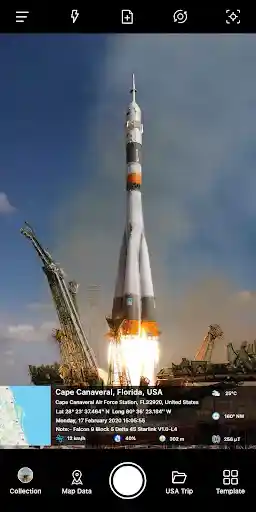


GPS Map Camera APK is a location-based photo application that helps you capture memories in the areas you have visited. This application is developed by GPS Map Camera with more than 50 million downloads on Google Play. With GPS Map Camera, you can label locations right on images, videos, and many other interesting features await.
Introduce about GPS Map Camera
Are you a frequent traveler, love to explore and want to share moments with others? Or simply want to store these memories in the most accurate way? Then try the GPS Map Camera application to achieve your goal. In today’s article, let’s learn about GPS Map Camera together.
What’s different about taking photos with GPS Map Camera?
The GPS Map Camera application is simply a photo-taking software with the ability to label locations quite interestingly. As soon as you grant basic permissions related to taking photos and storing, the application immediately shows you a familiar, easy-to-use photo-taking program. We will not go into detail about this photo-taking program. The most noteworthy point is the location labels that appear on the screen.
Through location access, these labels will display your current location information. This information is very detailed, including a small map with street names, wards, communes, coordinates and time details. With these parameters, you do not need to access detailed images to find out. This helps some work related to location issues to be more transparent.
Change the position
Not only does it take photos with the current location tag, GPS Map Camera also allows you to create manual locations or save locations you have been to for reuse. This is quite simple, just select the Locations section and select the plus sign. A visual map will then appear for you to select the location. You can immediately save the current location with your own title and customize the area’s range. These locations can be reused when you take photos or edit photos taken with other applications.
Choose from different templates
Currently, GPS Map Camera has a small number of templates. With the goal of providing accurate location information, it seems that the developer does not pay too much attention to this issue. The three templates include:
- Classic: Includes a seamless map and location information.
- Advanced: The map displays the same location information with rounded corners and a little space.
- The report template has a Check in box. In my opinion, it looks the best of the three.
Customize location label parameters
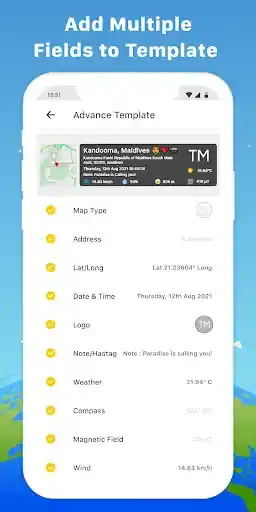
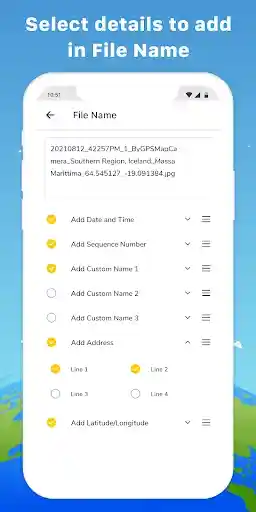
If you are a minimalist user, GPS Map Camera offers you the ability to customize location information. With a relatively large number of location options, you can create extremely diverse location labels according to your own preferences. These customizations can be turned on or off if you want, they include: Map type (Normal, Satellite, Terrain, Hybrid), Short address, Full address, Country flag, Lat/Long, Plus code, Date and time… Along with many other settings for size, color, position of location labels.
Image map
After granting storage access to GPS Map Camera, you can see a real map of the location of the photos taken. With today’s smart devices, every time you take a photo, they store the location of the photo. Through this, GPS Map Camera has created a map with visual image pins. This helps you know where and when you took the photos – something that few users remember after taking the photo.
Advantages of GPS Map Camera
GPS Map Camera has many advantages that are enough for you to choose this application to store memories. They include:
- Simple interface, easy to use: You do not need to install or customize much, you can use it immediately.
- Multi-function: In addition to location information, there is also information about weather, altitude, compass, etc.
- Useful in field work: Location transparency, you can check the real location of the image.
- Diverse customization: Edit label information as you like.
Limitations
Although it has many advantages, GPS Map Camera still has some limitations:
- Quite a lot of ads appear in the free version.
- The economical Premium version does not remove ads from the app.
- Dependent on your GPS: If you use older devices, GPS may be inaccurate.
- Battery drains faster with continuous use of GPS and data.
- Dependent on device hardware: Many features cannot work if the device does not have some necessary sensors.
Download GPS Map Camera APK for Android
Although GPS Map Camera was launched in 2020, it is still regularly edited and upgraded. With this application, you can use it for many different purposes and jobs. It will definitely be useful to you at some point. Now, download GPS Map Camera APK here and experience all the features that this application has.
App Info
| Updated On | |
|---|---|
| Google Play ID | com.gpsmapcamera.geotagginglocationonphoto |
| Category | Photos & Videos |
| Size | 26 MB |
| Requires | Android 6.0+ |
| Internet Required | |
| Not Required | |